What rock was large enough that I somehow was unaware of this book's existence the last 20 years of my life?
I just finished reading The Cuckoo's Egg: Tracking a Spy Through the Maze of Computer Espionage by Cliff Stoll. The book is based on the true account of Cliff Stoll's experience tracking a hacker through a laboratory computer network at Berkeley in the mid 1980's. The author quickly finds himself in a year long obsession that involved military targets, several US government agencies, and law enforcement from multiple continents.
The story completely sucked me in. The amazing part is more than 25 years later, with the exception of bandwidth and the shear number of targets, not much has really changed. Detective book fans will enjoy it. Security geeks will love it. Incident Responders should be required to read it.
Thursday, December 23, 2010
Not Just Another Analysis of Scareware
Introduction to our Sample
The initial infection came to my attention from an end user. He had reported all Google searches from his browser seemed to be forwarding to hxxp://findgala.com and he was getting warnings about malware on his computer. The system infected was a reasonably up to date Windows 7 notebook. The system was missing the latest patch for Adobe Flash (v 10.1.102.64). The user did not have administrator privileges, the windows firewall was enabled, Internet Explorer 8 with the default of medium/high security was set for the Internet Zone, and Symantec Endpoint 11.X was installed with up to date definition files. Note that Windows UAC was NOT enabled.
A quick assessment of the system determined it had been infected with some form of scareware. All existing desktop shortcuts had been removed and two shortcuts named "Computer" and "Internet Security Suite" remained. These pointed to "C:\ProgramData\891b6\ISe6d_2229.exe /z" and "C:\ProgramData\e6db66\ISe6d_2229.exe /hkd" respectively. The folder containing the executable was marked hidden and I noted the process was running via TACKIST /SVC. An icon running in the system tray when accessed presented the following screen.
Symantec Endpoint Protection seemed to be neutered by the infection as did several other Windows tools including Task Manager. Initial searching on the internet for the title of the malware only pulled links to legitimate Anti Malware products including CA, Zone Alarm, and Verizon's Internet Security Suite service.Virus Total returned the following analysis. Here is a summary of the file submitted:
Static Analysis
I began with static analysis of the file system by mounting the image with FTK Imager Lite. I exported the Master File Table and parsed it with analyzeMFT . With the estimated time of infection obtained from the victim I was able to pinpoint the file's created and modified during the initial infection.

The initial few files listed in the MFT caught my attention first.
I moved on to use the MFT to locate all files associated with the infection and export the hashes. Here is a summary files found in the /[root]/ProgramData folder:
There were also strings associated with a Microsoft Windows manifest file. Such a file can be embedded in software by the developer to instruct Windows Vista and Windows 7 on what Privileges the software needs to run as. The default setting of "run as the user" was obtained from the strings:
Dynamic Analysis
I began dynamic analysis by first attempting to infect a virtualized Windows 7 system in my lab (Note: all initial attempts were with administrator privileges with UAC disabled). Running the executable seemed to generate a runtime error, so I attempted to run it from the command prompt with the /hkd switch found in the desktop shortcut during static analysis. Process Monitor was used in an attempt to capture all file, registry, and network connection changes during infection. The following error was displayed;
Thinking it picked up on Process Monitor, I tried again but without procmon.exe but I was presented with the same error. It seemed that this sample was VM aware. Again I attempted to infect a clean install of Windows 7 on physical hardware with procmon.exe and again, I was met with failure. I turned to utilizing CaptureBat to monitor file and registry changes during install. Infection proceeded but I noted my sample used for analysis had been removed. On further inspection, it appeared that a .bat file was the culprit. The contents of the file were as follows;
Please note, no attempt was made to identify these files as legitimate malware by myself, although that may be an interesting exercise for another time. Not unlike an episode of the Soprano's, the victim is intimidated into buying protection and is offered several opportunities to buy a subscription. Multiple subscription options are available.
At one point my lab system spewed a blood curdling scream from its speakers before displaying yet another option to "protect" oneself (a little over the top if you ask me). My favorite feature goes to Chat Support however.
I do not think Jane appreciated my bluntness. Network connections for both the subscription service and chat support sessions were collected with the following script which leverages the netstat command.
Soon after this behavor was noted. The executable associated with the infection was mysteriously removed from the system. Attempts to duplicate this behavior later failed.
Further analysis of the infection and sample was done without administrator rights and with UAC disabled. No edit of the hosts file or registry keys in HKLM were noted, however. The malware still setup shop within the ProgramData and User Profile locations noted with the earlier analysis but the fact the user with the original infection had no administrator rights and the host file and HKLM keys were modified remains a bit of a mystery. One might speculate, the original payload might behave differently.
Further Google searching utilizing these findings led me to Microsoft's Malware Protecton Center write-up on Rogue:Win32/FakeVimes. Although Virus Total had not indicated such, it would seem our sample has had many aliases and upgrades.
Lessons Learned
All in all I learned a lot and had fun analyzing the sample (it beats watching sitcoms). Few things I noted for future analysis attempts.
Feel free to ping me if you would like a copy of the sample. I would be more than happy to trade notes with others.
Update: Questions Unanswered
Updated on December 30, 2010.
Curt Wilson was kind enough to comment on my analysis earlier this week. He brought up an interesting tidbit that I had missed. The title of error message displayed when attempting to perform dynamic analysis in a virtualized environment references Themida, a known packer used in malware. The following screen shot obtained from Google images is telling:
According to the results of my initial Google searches, Themida has been around for some time. There are some scripts available for OllyDbg to unpack executables using this tech so I hope to continue down the rabbit hole.
Moreover, I think the files placed in the recent folder of the user profile is worth a quick look, as is the payloads of packet captures. Looks like I have some interesting commutes ahead of me on the train. Until Part II of the analysis, Happy Hunting!

The initial infection came to my attention from an end user. He had reported all Google searches from his browser seemed to be forwarding to hxxp://findgala.com and he was getting warnings about malware on his computer. The system infected was a reasonably up to date Windows 7 notebook. The system was missing the latest patch for Adobe Flash (v 10.1.102.64). The user did not have administrator privileges, the windows firewall was enabled, Internet Explorer 8 with the default of medium/high security was set for the Internet Zone, and Symantec Endpoint 11.X was installed with up to date definition files. Note that Windows UAC was NOT enabled.
A quick assessment of the system determined it had been infected with some form of scareware. All existing desktop shortcuts had been removed and two shortcuts named "Computer" and "Internet Security Suite" remained. These pointed to "C:\ProgramData\891b6\ISe6d_2229.exe /z" and "C:\ProgramData\e6db66\ISe6d_2229.exe /hkd" respectively. The folder containing the executable was marked hidden and I noted the process was running via TACKIST /SVC. An icon running in the system tray when accessed presented the following screen.
Symantec Endpoint Protection seemed to be neutered by the infection as did several other Windows tools including Task Manager. Initial searching on the internet for the title of the malware only pulled links to legitimate Anti Malware products including CA, Zone Alarm, and Verizon's Internet Security Suite service.Virus Total returned the following analysis. Here is a summary of the file submitted:
File Name: ISe6d_2229.exeMy general impression of the GUI was this was a well designed piece of code. I imaged the system with dd and instructed the desktop engineers to wipe the system and reset all the user passwords. This proved to be a mistake on my part as I did not verify my image before they wiped the system. Later I found myself unable to boot the raw image in VMware after converting it to a VMDK with Raw2VMDK (blue screen on loading the OS).
File Type: Windows 32 bit Portable Executable
MD5: 699ebebcac9aaeff67bee94571e373a1
SHA1: ed763d1bc340db5b4848eeaa6491b7d58606ade2
File size: 3590656 bytes
First seen: 2010-11-14 01:20:29
Last seen: 2010-11-16 15:52:22
Static Analysis
I began with static analysis of the file system by mounting the image with FTK Imager Lite. I exported the Master File Table and parsed it with analyzeMFT . With the estimated time of infection obtained from the victim I was able to pinpoint the file's created and modified during the initial infection.
The initial few files listed in the MFT caught my attention first.
The two prefetch files should give a hint of the name and location of the payload. I use Prefetch Parser to parse the C:\Windows\Prefetch folder to obtain some more details:
Record Type Parent Filename 63861 Folder 602 e6db66 63915 File 2755 TASKKILL.EXE-8F5B2253.pf 63926 File 2755 SETUP_2229[1].EXE-11C68EE8.pf 63923 File 63861 ISe6d_2229.exe
Further analysis of the .pf files gave me the location and names.
Record File Times Run UTC Time SETUP_2229[1].EXE-11C68EE8.pf SETUP_2229[1].EXE 1 Sat Nov 13 01:16:53 2010 TASKKILL.EXE-8F5B2253.pf TASKKILL.EXE 1 Sat Nov 13 01:16:53 2010 RUNDLL32.EXE-80EAA685.pf RUNDLL32.EXE 1 Sat Nov 13 01:17:16 2010
SETUP_2229[1].EXE-11C68EE8.pfIt does appear the sample originated from the web. Unfortunately, I could not locate SETUP_2229[1].EXE or ANPRICE=85[1].HTM in the image. Most likely overwritten after several days of use post infection, I moved on the parsing the Internet browser history by using MiTeC Windows File Analyzer and began parsing the last few web sites and searches completed by the user. Unsuccessful in locating the source of the payload, I was not able to verify if it was delivered via a vulnerability or user interaction.
\USERS\%USERNAME%\APPDATA\LOCAL\MICROSOFT\WINDOWS\TEMPORARY INTERNET FILES\CONTENT.IE5\G4KYBRHH\SETUP_2229[1].EXE
TASKKILL.EXE-8F5B2253.pf
\USERS\%USERNAME%\APPDATA\LOCAL\MICROSOFT\WINDOWS\TEMPORARY INTERNET FILES\CONTENT.IE5\G4KYBRHH\ANPRICE=85[1].HTM
RUNDLL32.EXE-80EAA685.pf
\PROGRAMDATA\E6DB66\ISE6D_2229.EXE
I moved on to use the MFT to locate all files associated with the infection and export the hashes. Here is a summary files found in the /[root]/ProgramData folder:
The following summarizes files found in the /[root]/users/%username%/ folder:
MD5 File cd407baa9a55b9c303f0c184a68acc5c \E6DB66\6139ba67beb5a1febb1e8cfc73a42e9c.ocx 699ebebcac9aaeff67bee94571e373a1 \E6DB66\ISE6D_2229.EXE 2e317d604f25e03b8e8448c6884f64e3 \E6DB66\ISS.ico 3ee5ee57af2f62a47d2e93e9346b950f \E6DB66\mcp.ico be44f801f25678e1ffdd12600f1c0bc7 \ISKPQQMS\ISXPLLS.cfg
I also noted that the hosts file had been modified at the time of infection. The following is a sample of entries that had been added (note: additional countries root domain entries for the top search engines were also added but are not included in this analysis for simplicity's sake):
MD5 File 2b7509a2221174a82f6a886bbdd2e115 \Desktop\Computer.lnk fb16300f2f9799376807b13ad8314ca2 \Desktop\Internet Security Suite.lnk fd00cfeecc333aedc56fd428f2b9b5ba \AppData\Roaming\Internet Security Suite\Instructions.ini 4635f17db7d2f51651bebe61ba2f4537 \AppData\Roaming\Microsoft\Windows\Recent\ANTIGEN.dll 6032703c3efc5f3d3f314a3d42e2a500 \AppData\Roaming\Microsoft\Windows\Recent\cb.exe 12ddf77984d6f2e81a41f164bea12a1c \AppData\Roaming\Microsoft\Windows\Recent\cid.sys 81c9ad6037c14537044b3e54d8b84c99 \AppData\Roaming\Microsoft\Windows\Recent\ddv.exe f28c20c6df79e9fe68b88fb425d36d57 \AppData\Roaming\Microsoft\Windows\Recent\eb.sys 6274e77cd16d6dbec2bb3615ff043694 \AppData\Roaming\Microsoft\Windows\Recent\energy.drv a3342f285bfb581f0a4e786cc90176d2 \AppData\Roaming\Microsoft\Windows\Recent\energy.sys 1ac2fb2dbd0023b54a8f083d9abbf6db \AppData\Roaming\Microsoft\Windows\Recent\exec.exe 2dc3df846ff537b6c3e6d74475a0d03d \AppData\Roaming\Microsoft\Windows\Recent\FW.drv a32f789b1b6f281208fa1c8d54bf8cdc \AppData\Roaming\Microsoft\Windows\Recent\gid.dll b48d1cc8765719a79a9352e2b8f891ef \AppData\Roaming\Microsoft\Windows\Recent\hymt.exe 532c6465f4dd9c7bce31b7a7986e3270 \AppData\Roaming\Microsoft\Windows\Recent\hymt.sys f941f6eedf5b33a0b49b9787d5f0dfc2 \AppData\Roaming\Microsoft\Windows\Recent\kernel32.sys 2ff0c3a804b85d3e7e6487d9bece6416 \AppData\Roaming\Microsoft\Windows\Recent\PE.dll 454f06575c9214f7b9cb01c606fd72fe \AppData\Roaming\Microsoft\Windows\Recent\PE.sys 243b5a8a95bb4f8822790b8f0c81b82a \AppData\Roaming\Microsoft\Windows\Recent\ppal.exe 9d34330ec68d148cc5701d6cd279c84c \AppData\Roaming\Microsoft\Windows\Recent\SICKBOY.drv 493fc17532f9b6ac330dbdb3a01a5361 \AppData\Roaming\Microsoft\Windows\Recent\sld.drv d0d210a62cb66ff452e9a5cfc8e8f354 \AppData\Roaming\Microsoft\Windows\Recent\SM.sys a2ca707ee60338ac5ec964f7685752ba \AppData\Roaming\Microsoft\Windows\Recent\std.dll a1e25ab2f19565f707d85e471f41e08f \AppData\Roaming\Microsoft\Windows\Recent\snl2w.dll
74.125.45.100 4-open-davinci.comUsing bintext to pull the strings from ISe6d_2229.exe provided a few interesting things of note. Specifically a company and product name of "limnol" and file and product version of "1.1.0.1010". Searches for this reference with some added keywords found some additional submissions to virus total but nothing that was not already known from my earlier submission.
74.125.45.100 securitysoftwarepayments.com
74.125.45.100 privatesecuredpayments.com
74.125.45.100 secure.privatesecuredpayments.com
74.125.45.100 getantivirusplusnow.com
74.125.45.100 secure-plus-payments.com
74.125.45.100 www.getantivirusplusnow.com
74.125.45.100 www.secure-plus-payments.com
74.125.45.100 www.getavplusnow.com
74.125.45.100 safebrowsing-cache.google.com
74.125.45.100 urs.microsoft.com
74.125.45.100 www.securesoftwarebill.com
74.125.45.100 secure.paysecuresystem.com
74.125.45.100 paysoftbillsolution.com
74.125.45.100 protected.maxisoftwaremart.com
69.72.252.252 www.google.com
69.72.252.252 google.com
69.72.252.252 www.google.no
69.72.252.252 www.google-analytics.com
69.72.252.252 www.bing.com
69.72.252.252 search.yahoo.com
69.72.252.252 www.youtube.com
There were also strings associated with a Microsoft Windows manifest file. Such a file can be embedded in software by the developer to instruct Windows Vista and Windows 7 on what Privileges the software needs to run as. The default setting of "run as the user" was obtained from the strings:
<security>I continued the analysis by taking a look at the Windows registry. This was done by exporting the HKCU and HKCM hives from the raw image and using both RegRipper and MiTeC Windows Registry Recovery to analyze the entries. The HKCU Run key contained an entry to autostart the executable on startup.
<requestedprivileges>
<requestedexecutionlevel level="asInvoker" uiaccess="false"></requestedexecutionlevel>
</requestedprivileges>
</security>
[HKEY_CURRENT_USER\Software\Microsoft\Windows\CurrentVersion\Run]In addition, I was able to verify that the registry contained an entry for findgala.com under:
"Internet Security Suite"="\"C:\\ProgramData\\e6db66\\ISe6d_2229.exe\" /s /d"
[HKEY_CURRENT_USER\Software\Microsoft\Internet Explorer\SearchScopes]The [HKEY_CURRENT_USER\Software\Internet Security Suite] key contained several subkeys within it. The entries here seemed to be similar to the contents of the Instructions.ini file found earlier in the appdata folder of the user profile. This file resided in a hidden folder with the same name as the registry key. I have listed one entry as an example here.
"URL"="http://findgala.com/?&uid=2229&q={searchTerms}"
[HKEY_CURRENT_USER\Software\Internet Security Suite\23071C180E1E]Lastly, the [HKEY_LOCAL_MACHINE\SOFTWARE\Microsoft\Windows NT\CurrentVersion\Image File Execution Options\] key had several entries for what appeared to be legitimate software, tools, and other forms of malware. Entries included; taskmgr.exe, rtvscan.exe (Symantec Endpoint Protection), and dozens of other programs. All legitimate and illegitimate software was being blocked via an entry for debugger with a value of "svchost.exe".
"3016131C2F0B18311F0CF4D5EBEEE1"="4746574B4E544E4D4F4FA0B0B8B2B5BFB7BEA8D9C7"
"23071C180E1E31180D0CE1E6E7"=""
"2205012C0A1F2814131A"="4746574B4E544E4D4F4FA0B0B8B3BDBFB2B7A8D9C7"
"3A160B0D2E090534100CF4F3F7E0F0ECE9E9"="4746574B4E544E4D4F4FA0B0B8B2B5BFB7BEA8D9C7"
"3A160B0D3C1E19192E3BCD"="4746574B4E544E4D4F4FA0B0B8B3BDBFB2B7A8D9C7"
"3A160B0D2F0B181C0A1A"="4746574B4E544E4D4F4FA0B0B8B3BDBFB2B7A8D9C7"
"3A160B0D34140E101F13D5F1E6E2F0E0"="4746574B4E544E4D4F4FA0B0B8B2B5BFB7BEA8D9C7"
"3E22081D1B0F19"="46"
"24181415181A1F16"=""
"2205012C0A1F1D091B2DF5EFC1ECF1EBF2"="46"
"3E1E1C1D1F15290D1A1EF4E4C1ECF1EBF2"="46"
"3B1E0A0B15093F120B11F4"="46"
"3218151813154C"=""
"23071C180E1E"="46"
Dynamic Analysis
I began dynamic analysis by first attempting to infect a virtualized Windows 7 system in my lab (Note: all initial attempts were with administrator privileges with UAC disabled). Running the executable seemed to generate a runtime error, so I attempted to run it from the command prompt with the /hkd switch found in the desktop shortcut during static analysis. Process Monitor was used in an attempt to capture all file, registry, and network connection changes during infection. The following error was displayed;
Thinking it picked up on Process Monitor, I tried again but without procmon.exe but I was presented with the same error. It seemed that this sample was VM aware. Again I attempted to infect a clean install of Windows 7 on physical hardware with procmon.exe and again, I was met with failure. I turned to utilizing CaptureBat to monitor file and registry changes during install. Infection proceeded but I noted my sample used for analysis had been removed. On further inspection, it appeared that a .bat file was the culprit. The contents of the file were as follows;
MD5 FileNameI also noted the name of the files and folders associated with the malware seem to vary on each infection. Verification of hashes proved that it was indeed the same malicious program however. File and registry monitoring verified the findings from the static analysis and I noted some additional changes as well. It appeared the rogue software attempts to disable UAC by editing the following registry keys;
329e8a313f20cd8b4ebf67642331c007 \Users\bugbear\AppData\Local\Temp\del.bat
:Repeat
del "C:\Users\bugbear\Desktop\e6db66\ISE6D_~1.EXE"
if exist "C:\Users\bugbear\Desktop\e6db66\ISE6D_~1.EXE" goto Repeat
del "C:\Users\bugbear\AppData\Local\Temp\del.bat"
registry: SetValueKey C:\Users\bugbear\Desktop\e6db66\ISe6d_2229.exe -> HKLM\SOFTWARE\Microsoft\Windows\CurrentVersion\Policies\System\ConsentPromptBehaviorAdminAdditional registry entries in HKEY_Current_User were also modified. Including the Internet Explorer proxy and wpad settings under [HKCU\Software\Microsoft\Windows\CurrentVersion\Internet Settings]. Additionally, rather than modify the host file directly, the executable seemed to create a temporary host file, remove the old one, and replace it with this new version.
registry: SetValueKey C:\Users\bugbear\Desktop\e6db66\ISe6d_2229.exe -> HKLM\SOFTWARE\Microsoft\Windows\CurrentVersion\Policies\System\ConsentPromptBehaviorUser
registry: SetValueKey C:\Users\bugbear\Desktop\e6db66\ISe6d_2229.exe -> HKLM\SOFTWARE\Microsoft\Windows\CurrentVersion\Policies\System\EnableLUA
file: Write C:\Users\bugbear\Desktop\e6db66\ISe6d_2229.exe -> C:\Windows\System32\drivers\etc\host_newTypical "features" associated with scareware seemed to be included with this sample. The rogue software begins a "scan" of the infected system immediately upon execution. Scan results display "infected" files located in [root]\Users\%username%\AppData\Roaming\Microsoft\Windows\Recent\ folder identified during static analysis.
file: Delete C:\Users\bugbear\Desktop\e6db66\ISe6d_2229.exe -> C:\Windows\System32\drivers\etc\hosts
file: Write C:\Users\bugbear\Desktop\e6db66\ISe6d_2229.exe -> C:\Windows\System32\drivers\etc\hosts
file: Delete C:\Users\bugbear\Desktop\e6db66\ISe6d_2229.exe -> C:\Windows\System32\drivers\etc\host_new
Please note, no attempt was made to identify these files as legitimate malware by myself, although that may be an interesting exercise for another time. Not unlike an episode of the Soprano's, the victim is intimidated into buying protection and is offered several opportunities to buy a subscription. Multiple subscription options are available.
At one point my lab system spewed a blood curdling scream from its speakers before displaying yet another option to "protect" oneself (a little over the top if you ask me). My favorite feature goes to Chat Support however.
I do not think Jane appreciated my bluntness. Network connections for both the subscription service and chat support sessions were collected with the following script which leverages the netstat command.
for /L %1 in (0,0,0) do netstat -anob>>C:\netstat.txtBoth IP addresses associated with the subscription service and chat support sessions were registered to hosting providers here in the US. The strangest behavior observed however, was captured with Process Explorer and Wireshark post infection. Multiple instances of ping.exe running under cmd.exe were noted. Upon examination of the packet capture, it appeared the processes were spewing ICMP and SYN packets to two IP Addresses registered to .RU domains.
Soon after this behavor was noted. The executable associated with the infection was mysteriously removed from the system. Attempts to duplicate this behavior later failed.
Further analysis of the infection and sample was done without administrator rights and with UAC disabled. No edit of the hosts file or registry keys in HKLM were noted, however. The malware still setup shop within the ProgramData and User Profile locations noted with the earlier analysis but the fact the user with the original infection had no administrator rights and the host file and HKLM keys were modified remains a bit of a mystery. One might speculate, the original payload might behave differently.
Further Google searching utilizing these findings led me to Microsoft's Malware Protecton Center write-up on Rogue:Win32/FakeVimes. Although Virus Total had not indicated such, it would seem our sample has had many aliases and upgrades.
Lessons Learned
All in all I learned a lot and had fun analyzing the sample (it beats watching sitcoms). Few things I noted for future analysis attempts.
- Always verify your images and keep the original copy if possible (aka don't be a dumbass Tim)
- Static file forensics techniques can be very useful during malware analysis
- Have multiple tools that can perform similar tasks is sometimes needed
- Fear is a powerful marketing angle and the bad guys are getting better at it
Feel free to ping me if you would like a copy of the sample. I would be more than happy to trade notes with others.
Update: Questions Unanswered
Updated on December 30, 2010.
Curt Wilson was kind enough to comment on my analysis earlier this week. He brought up an interesting tidbit that I had missed. The title of error message displayed when attempting to perform dynamic analysis in a virtualized environment references Themida, a known packer used in malware. The following screen shot obtained from Google images is telling:
According to the results of my initial Google searches, Themida has been around for some time. There are some scripts available for OllyDbg to unpack executables using this tech so I hope to continue down the rabbit hole.
Moreover, I think the files placed in the recent folder of the user profile is worth a quick look, as is the payloads of packet captures. Looks like I have some interesting commutes ahead of me on the train. Until Part II of the analysis, Happy Hunting!
Wednesday, October 13, 2010
Hacking a Fix
There have been many discussions, rants, and commentary on what it means to be a hacker. Many of us in the security community use the term in its original intended use and despise the way the media and popular culture portrays it. Hacking to many of us is about learning and using that knowledge to make improvements upon software and hardware. I have previously posted about the resourcefulness of people that define themselves as hackers. My coding skills are certainly not L337 and I am certainly not dropping 0-day but what I am very skilled at is understanding technical issues and finding unique solutions to them. This post is on one such issue and my obsession to fix it.
The Backstory
I recently exchanged emails with APC support on their use of a self signed certificate for SSL access to the web management interface of Powerchute Network Shutdown (PCNS). Powerchute Network Shutdown is used in conjunction with APC Universal Power Supplies (UPS). The product is used to manage and shutdown servers during power issues and outages. The most recent release is version 2.2.4.
In previous releases, APC did not support SSL for remote access to the web interface of PCNS. Although the current version now defaults to https, it only supports the use of a self signed certificate provided by APC. The risks of self signed certificates are well recognized. Such configurations can make a Man-in-the-Middle attack on an https session trivial.
While using a firewall to limit access to the web application or disabling the web service are certainly viable options in some environments, it may not be in others. Since I have a lot of free time during my commute and I tend to obsess about such things, I decided the fix the issue myself.
Poking the Source Code
By default APC PCNS can be found in the C:\Program Files\APC\PowerChute\group1 directory of a Windows system. The software is also available for several *nix distros, so consult the documentation as needed. The web server runs on port 6547 and is hosted on Jetty (Version 6.0.0). By default, version 1.5.0.18 of the Java Runtime Environment (JRE) is installed in C:\Program Files\AP\jre\jre1.5.0_18 directory.
Although this version of JRE has had its share of vulnerabilities, that is not the focus of this post (although if your reading this APC you may want to consider updating your shit).
I began by decompiling the .jar files associated with the application with Java Decompiler by Emmanuel Dupuy. A nice feature of Java Decompiler is its search capabilities. This is very useful to find what you’re looking for quickly or in my case stumble through the source code awkwardly. I quickly located the WebServerSettings class in the webServer.jar file.
Yes that is the password to the Java keystore hardcoded. Convenient isn’t it?
Certificate Management Hell
So using this newly obtained password we can view the current self signed certificate within the Java keystore with keytool utility included with the runtime environment.
Once found, I removed the current keystore entry, generated a new one, and created a csr for submission to my CA.
After, installation, you must restart the PCNS1 service. Once restarted you can now enjoy your new, shiny, valid certificate. You may also want to consider changing the keystore password. While this is trivial to do using the keytool utility, the webserver.jar file will need to be altered to reflect the change and then recompiled using the JDK. For this reason, most of the Java development forums I read noted that hard coding the password is not practical. From a security perspective, no matter where the password is stored, you must trust the system storing it. Although I would suspect using the same static password across multiple independent systems is not ideal. If you have experience with the development and security of such systems I am interested in hearing your thoughts on this.
The "R" Word
So what is the Risk? As I mentioned earlier, using a self signed certificate is risky in regards to Man-In-The-Middle attacks. Users tend to ignore certificate warnings. Moreover, it is very feasible to pass a victim the legitimate self signed certificate during an attack. Consequently, the use of a self signed certificate is not providing much protection except against passive sniffing. If the web session to APC PCNS is hijacked, then the credentials to the application could become compromised. Once access is gained, one obvious scenario would be a Denial of Service (DOS) attack by shutting down the systems controlled by the application. I wanted to find something a bit more nefarious, however. It so happens that PCNS allows administrators to not only shutdown systems when events are triggered but also run command files.
Note that the command file does not need to be located on the server being attacked. It also should be noted that if running multiple executables from a command file, the following syntax needs to be followed due to a bug in the current release (thank you readme.txt). Note: quotes are only needed if the path contains spaces.
The Backstory
I recently exchanged emails with APC support on their use of a self signed certificate for SSL access to the web management interface of Powerchute Network Shutdown (PCNS). Powerchute Network Shutdown is used in conjunction with APC Universal Power Supplies (UPS). The product is used to manage and shutdown servers during power issues and outages. The most recent release is version 2.2.4.
In previous releases, APC did not support SSL for remote access to the web interface of PCNS. Although the current version now defaults to https, it only supports the use of a self signed certificate provided by APC. The risks of self signed certificates are well recognized. Such configurations can make a Man-in-the-Middle attack on an https session trivial.
While using a firewall to limit access to the web application or disabling the web service are certainly viable options in some environments, it may not be in others. Since I have a lot of free time during my commute and I tend to obsess about such things, I decided the fix the issue myself.
Poking the Source Code
By default APC PCNS can be found in the C:\Program Files\APC\PowerChute\group1 directory of a Windows system. The software is also available for several *nix distros, so consult the documentation as needed. The web server runs on port 6547 and is hosted on Jetty (Version 6.0.0). By default, version 1.5.0.18 of the Java Runtime Environment (JRE) is installed in C:\Program Files\AP\jre\jre1.5.0_18 directory.
Although this version of JRE has had its share of vulnerabilities, that is not the focus of this post (although if your reading this APC you may want to consider updating your shit).
I began by decompiling the .jar files associated with the application with Java Decompiler by Emmanuel Dupuy. A nice feature of Java Decompiler is its search capabilities. This is very useful to find what you’re looking for quickly or in my case stumble through the source code awkwardly. I quickly located the WebServerSettings class in the webServer.jar file.
Yes that is the password to the Java keystore hardcoded. Convenient isn’t it?
Certificate Management Hell
So using this newly obtained password we can view the current self signed certificate within the Java keystore with keytool utility included with the runtime environment.
>keytool -list -v -keystore "C:\Program Files\APC\PowerChute\group1\keystore"
Once found, I removed the current keystore entry, generated a new one, and created a csr for submission to my CA.
>keytool -delete -alias securekey -keystore "C:\Program Files\APC\PowerChute\group1\keystore"Please note the following are the default values for the keytool -genkey option. You may want to change these to suit your requirements.
>keytool -genkey -alias securekey -keystore "C:\Program Files\APC\PowerChute\group1\keystore" -dname CN=win7.securitybraindump.com,OU=Infosec,O=SecurityBraindump,L=Boston,S=Massachusetts,C=US"
>keytool -certreq -alias securekey -keystore "C:\Program Files\APC\PowerChute\group1\keystore" -file securekey.csr
-keyalg "DSA"For the purposes of this post I used a Windows 2003 CA (yes that is as ugly as it sounds but it is what I had readily had available at the time). To submit the csr to the CA, obtain my certificate, and export the CA Root certificate (for the chain) I used certreq.
-keysize 1024
-validity 90
-sigalg (Depends on the key algorithm chosen.) If the private key is "DSA", -sigalg defaults to "SHA1withDSA" or if "RSA", the default is "MD5withRSA".
>certreq -Submit -attrib "CertificateTemplate: WebServer" securekey.csr securekey.cerThe base-64 certificates can then be imported into the keystore using the -import option.
>certutil -ca.cert rootca.cer
>keytool -import -trustcacerts -v -alias rootca -file rootca.cer -keystore "C:\Program Files\APC\PowerChute\group1\keystore"Once imported, verification can be accomplished by using the keytool -list option again.
>keytool -import -v -alias securekey -file securekey.cer -keystore "C:\Program Files\APC\PowerChute\group1\keystore"
After, installation, you must restart the PCNS1 service. Once restarted you can now enjoy your new, shiny, valid certificate. You may also want to consider changing the keystore password. While this is trivial to do using the keytool utility, the webserver.jar file will need to be altered to reflect the change and then recompiled using the JDK. For this reason, most of the Java development forums I read noted that hard coding the password is not practical. From a security perspective, no matter where the password is stored, you must trust the system storing it. Although I would suspect using the same static password across multiple independent systems is not ideal. If you have experience with the development and security of such systems I am interested in hearing your thoughts on this.
The "R" Word
So what is the Risk? As I mentioned earlier, using a self signed certificate is risky in regards to Man-In-The-Middle attacks. Users tend to ignore certificate warnings. Moreover, it is very feasible to pass a victim the legitimate self signed certificate during an attack. Consequently, the use of a self signed certificate is not providing much protection except against passive sniffing. If the web session to APC PCNS is hijacked, then the credentials to the application could become compromised. Once access is gained, one obvious scenario would be a Denial of Service (DOS) attack by shutting down the systems controlled by the application. I wanted to find something a bit more nefarious, however. It so happens that PCNS allows administrators to not only shutdown systems when events are triggered but also run command files.
Note that the command file does not need to be located on the server being attacked. It also should be noted that if running multiple executables from a command file, the following syntax needs to be followed due to a bug in the current release (thank you readme.txt). Note: quotes are only needed if the path contains spaces.
@START "some path\evil.exe" argumentsI'll let the output from my evil.cmd file containing the "whoami > whoami.txt" command speak for itself;
@START "some otherpath\pwn.exe" arguments
nt authority\systemNUM! Happy Hunting!
Sunday, August 8, 2010
HacKid Conference
Updated: New Date! Registration and Schedule is live!
I was at SecurityBSides Boston talking to Bill Brenner and his two sons about Lego's when Chris Hoff shared a brilliant idea on twitter. A hacking/security conference for kids and their parents. Soon after Hackid was born and the dates for the first conference were set.
So put aside the weekend of October 9-10, 2010. The first conference will be held at the Microsoft New England Research & Development (NERD) Center in Cambridge, MA. The community driven content has been posted and registration is live. It is the hope of the organizers that this will become the template that can be used at other locations and dates.I think I share a lot of others sentiment when I say this is going to rock!
I was at SecurityBSides Boston talking to Bill Brenner and his two sons about Lego's when Chris Hoff shared a brilliant idea on twitter. A hacking/security conference for kids and their parents. Soon after Hackid was born and the dates for the first conference were set.
So put aside the weekend of October 9-10, 2010. The first conference will be held at the Microsoft New England Research & Development (NERD) Center in Cambridge, MA. The community driven content has been posted and registration is live. It is the hope of the organizers that this will become the template that can be used at other locations and dates.I think I share a lot of others sentiment when I say this is going to rock!
Tuesday, June 29, 2010
Firefox Add-ons FTW!
Just a quick post on passwords saved in the browser. After my post on credentials stored in the Windows 7 Vault, I started to think about browser passwords and the risks that lurk there. Chris Gates had a similar thought which he posted about yesterday, and Larry Pesce wrote up a detailed analysis last September.
I personally disable this feature in Firefox but a strong master password would certainly be advisable if you do save passwords within Firefox. While I do not use this feature, I do use a lot of Firefox add-on's. Gmail Notifier, Xmarks Bookmarks, and Echofon Twitter add-on's to name a few. So I naturally turned my attention to those.
I pondered where these add-on's were storing saved credentials. The answer is in same place Firefox stores them. What a more ironic way to verify this than to use a Firefox add-on (SQLLite Manager) to query the signons.sqlite database.
As previously covered by Gates and Pesce, conversion of the encrypted passwords is trivial as long as you also have access to the key3.db and there is no master password configured. If you are interested in the details of this, I suggest checking out the documentation here and tool available here.
While this may have been obvious to others, it was not to me. That is one of the many reasons I love this field.
Update August 09, 2010: Jeremiah Grossman presented his work entitled Breaking Browsers: Hacking Auto-Complete at Black Hat last week. The presentation included examples of using XSS to steal saved credentials in the Firefox and Chrome password managers.
I personally disable this feature in Firefox but a strong master password would certainly be advisable if you do save passwords within Firefox. While I do not use this feature, I do use a lot of Firefox add-on's. Gmail Notifier, Xmarks Bookmarks, and Echofon Twitter add-on's to name a few. So I naturally turned my attention to those.
I pondered where these add-on's were storing saved credentials. The answer is in same place Firefox stores them. What a more ironic way to verify this than to use a Firefox add-on (SQLLite Manager) to query the signons.sqlite database.
As previously covered by Gates and Pesce, conversion of the encrypted passwords is trivial as long as you also have access to the key3.db and there is no master password configured. If you are interested in the details of this, I suggest checking out the documentation here and tool available here.
While this may have been obvious to others, it was not to me. That is one of the many reasons I love this field.
Update August 09, 2010: Jeremiah Grossman presented his work entitled Breaking Browsers: Hacking Auto-Complete at Black Hat last week. The presentation included examples of using XSS to steal saved credentials in the Firefox and Chrome password managers.
Wednesday, June 16, 2010
Post Exploitation Pivoting with the Windows 7 Vault
I have been poking around with the updated version of Credential Manager in Windows 7 which has been commonly referred to as "Stored User Names and Passwords" in previous version of Windows. Much like its predecessors, the current version of Credential Manager still uses Data Protection API (DPAPI), but Windows 7 now stores saved credentials within the Windows Vault. Such credentials can include; user names and passwords used to log on to network shares, websites that use Windows Integrated Authentication, Terminal Services, and many third party applications such as Google Talk .Credential Manager and DPAPI has been under scrutiny in the past. Cain & Able has had a decoder for some time. More recently, researchers from Standford University presented at Black Hat DC 2010 about their DPAPI research.
While breaking the crypto associated with this feature might be useful (i.e. if credentials are re-used elsewhere), it is not always necessary. The purpose of the Credential Manager is to pass saved credentials to resources commonly accessed by the user. Once you have gained access to a host as the unprivileged user (take you pick of code execution bugs, Adobe pdf's seem to be popular these days), then you can certainly leverage this feature to pivot to resources referenced within the Windows Vault. Keeping a low forensics profile would be preferred, so I attempted to find existing command line tools that were already available on the host. After poking at Windows 7 for a while, I found an undocumented utility called vaultcmd.exe in the System32 folder that appeared useful. The following is the output of the supported switches for vaultcmd;
The /list switch allows us to view all Windows Vaults available on the host for the current authenticated user.
It appears in this example, the two default Vaults are the only ones that exist on this host. Also note that since the user is already authenticated, the vaults are in an unlocked state. Running the /listproperties switch against each vault lists some more details, including the number of credentials saved in each location.
Finally, the /listcreds switch gives us our newly found targets.
It appears, our unprivileged user has stored domain administrator credentials for two domain controllers. While this is certainly more secure than running as domain administrator locally, DPAPI adds no added security in this scenario since local access to this host has been gained. Now that we have completed our reconnaissance, we can pivot and access the servers by simply using the installed tools at our disposal. In the following example, I use psexec and the SET command to verify I have domain administrator access to DC-01 without having to specify a user name and password.
I was also able to access the the domain controller's Admin shares via the NET USE command using stored credentials within the Windows Vault.
net use P: \\dc-01\C$In addition, since the Windows Server Administrator tools were also already installed on the host, I also verified that the Windows Vault was passing these credentials to Active Directory Users and Computers and the Remote Desktops Client.
I attempted to change some of the default settings for the vault using the /setproperties switch. For Example; it appears that vaultcmd has the ability to set a password on a vault;
vaultcmd /setproperties:"Windows Vault" /set:AddProtection /value:PasswordBut any attempt I made was met with the error; "The request is not supported.". So I would be interested to see if anyone can find additional documentation on this utility or the Windows Vault. I have not been successful in finding anything to date.
vaultcmd /setproperties:"Windows Vault" /set:DefaultProtection /value:Password
Some have suggested that any password management tool that hooks into the browser or operating system is more of a risk than a stand alone application that requires additional authentication mechanisms. While I generally agree with this, the emerging capabilities of attack and forensic tools that acquire volatile memory from a host (and consequently decrypted credentials), only require a bit more patience. Of course such tools, must be loaded on the compromised host increasing the forensic footprint the intruder leaves behind.
Happy Hunting!
Monday, June 7, 2010
Forensics Analysis: Windows Shadow Copies
Microsoft Windows Vista and 7 includes the Volume Shadow Copy Service (VSS) which are leveraged by System Restore and Windows Backup features of the Operating System. By default, this service is turned on and the amount of backups stored depends on the disk size and settings. There is a potential wealth of forensic evidence available within Shadow Copies and even though I am not the first to write about leveraging Shadow Copies for forensic purposes, I thought it was worth writing a quick post here.
Vssadmin is a command line tool that can be used to display current VSS backups. To do so, use the syntax;
Make sure to note the Shadow Copy Volume you want to analyze and use it with Mklink to create a symbolic link to the backup. For example;
Happy Hunting.
References:
MSDN Blog: A Simple Way to Access Shadow Copies in Vista
Updated June 10, 2011
I came across a great post from @4n6woman on using Log Parser to parse mounted VSC's and preserve the MD5 HAshes and Metadata for easy querying. Thought I would share.
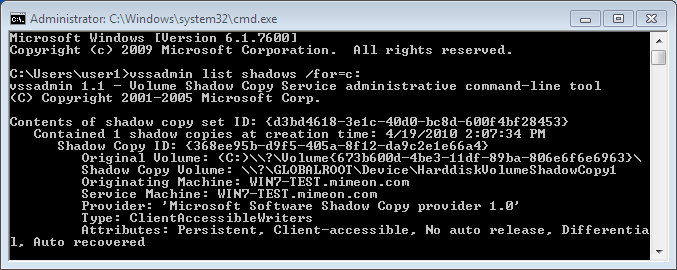
Vssadmin is a command line tool that can be used to display current VSS backups. To do so, use the syntax;
vssadmin list shadows /for=c: (where c: is the volume your working with).Here is an example of the output;
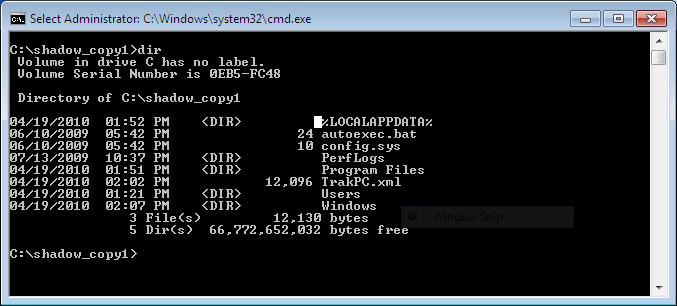
Make sure to note the Shadow Copy Volume you want to analyze and use it with Mklink to create a symbolic link to the backup. For example;
mklink /d C:\shadow_copy1 \\?\GLOBALROOT\Device\HarddiskVolumeShadowCopy1\ (note: the trailing back slash as it is needed).Once created you can browse the symbolic link as you would any folder and restore files of interest by copying them out.
Happy Hunting.
References:
MSDN Blog: A Simple Way to Access Shadow Copies in Vista
Updated June 10, 2011
I came across a great post from @4n6woman on using Log Parser to parse mounted VSC's and preserve the MD5 HAshes and Metadata for easy querying. Thought I would share.
Thursday, June 3, 2010
PaulDotCom EP200: The Hackers for Charity Podcast-a-Thon
Tomorrow I will be trekking south the hang with the PaulDotCom crew for the 8 hour recording of Episode 200. They will be streaming live and it looks like they are pulling out all the stops for this episode. There will be interviews, tech segments, and appearances from HD Moore, Johnny Long, Lenny Zeltzer, Ron Gula, Jack Daniel, and a couple of surprise guests.
The show is dedicated to raising awareness and money for Johnny Long's Hackers for Charity. If you are not familiar with the work Johnny is doing with HFC, take a look! Donations can be made via the donate button on the PaulDotCom website or via the HFC Get Involved Page. So help out with a donation and listen live tomorrow!
Monday, May 24, 2010
The Security Bloggers Network
Rich Mogull of Securosis recently published a blog post entitled Is Twitter Making Us Dumb? Bloggers, Please Come Back. Rich summarizes his experience starting a blog and shares his perspective on the diminishing amount of blogging. Alan Shimel who runs the Security Blogger Network quickly followed up with his own post.
I too have noticed that my RSS reader is not nearly as full as it once was. Many of the resources I have today in my RSS Reader came from the Security Bloggers Network after stumbling upon it several years ago. The blogs I was introduced to through the SBN opened up a new world for me. I was introduced to thoughts and opinions from every corner of the security community. Many of which I had never considered.
When I started my own blog about a year ago, it never occurred to me to even join. In retrospect, it may have been lack of confidence, as I was not sure what I was going to write about. I just knew that there were some thoughts I needed to rant about and blogging seemed like a logical medium. But I quickly found blogging to be an rewarding experience and I am currently backlogged with so many ideas for posts, I have enough material for the remainder of the year.
So I am proud to announce, I am a new member of the Security Bloggers Network. If you have a blog, I recommend you consider joining. If you do not have a blog I ask you to consider starting one, as it can be a rewarding experience to both the author and the reader, alike.
I too have noticed that my RSS reader is not nearly as full as it once was. Many of the resources I have today in my RSS Reader came from the Security Bloggers Network after stumbling upon it several years ago. The blogs I was introduced to through the SBN opened up a new world for me. I was introduced to thoughts and opinions from every corner of the security community. Many of which I had never considered.
When I started my own blog about a year ago, it never occurred to me to even join. In retrospect, it may have been lack of confidence, as I was not sure what I was going to write about. I just knew that there were some thoughts I needed to rant about and blogging seemed like a logical medium. But I quickly found blogging to be an rewarding experience and I am currently backlogged with so many ideas for posts, I have enough material for the remainder of the year.
So I am proud to announce, I am a new member of the Security Bloggers Network. If you have a blog, I recommend you consider joining. If you do not have a blog I ask you to consider starting one, as it can be a rewarding experience to both the author and the reader, alike.
Monday, May 3, 2010
Why Hackers make the Best IT Support Professionals
This is a thought that I have had brewing for some time and I will attempt to not rant too much. Throughout my IT career, I have been watching many IT Support professionals immediately go for a quick fix to technology issues. This is not to say a quick fix isn’t always warranted. The constant barrage of support issues, end users broad siding you as you attempt to grab lunch, and evolving technology is indeed a challenge. I feel your pain. I've been there, I've done that, and I still do it on a daily basis. The beating support people take can cause even the most saintly to lose his/her patience.
However, I feel the trend of the quick fix, seems to be worsening. In InfoSec, the quick fix is often used in conjunction with FUD (fear, uncertainly, and doubt) to sell those magical products with blinking lights that are going to make the latest attack vectors just magically disappear. The problem with this concept is the same in all subsets of Information Technology, however. How many of us have told colleagues, friends, and family to reboot as a solution to an issue? How many of us have told them to do so more than once for the same issue? See the quick fix is not really a fix at all, it is procrastination.
I like to think that we as IT Professionals, whether desktop support, enterprise architects, coders, or InfoSec pursued our career because we all had the common love of technology. Many of us have the inquisitive nature that would rival any scientist. This makes us all brothers and sisters alike. The inquisitive nature that I felt when powering on my TI99-4A in 1981 is still with me today. This is why I chose this career.
Some of the most inquisitive people I have met while working in IT have been those who have self dubbed themselves "hackers". These are not the "hackers" the media would have you believe are hijacking your wireless and stealing your digital valuables. These are self proclaimed geeks who love computers. They are not always InfoSec professionals. They may work on a helpdesk, as a systems administrator, or at the local Radio Shack. They enjoy taking things apart and putting them back together in ways that improve the technology. See hackers understand the concepts of efficiency and availability. These concepts are the foundation of supporting any business. It is what our employee’s pay us our salaries for, regardless of the subset of IT we may fall under.
Efficiency and availability is not about reboots and resets. It is about getting to the root of an issue, learning from it, and improving the system(s) from what you have learned. So take the time to understand the technology issues you come across. It can be fun and productive. If you are not feeling the love for your technology career of choice, then ask the hacker working at the local Radio Shack if he or she is willing to trade careers with you. I suspect they would jump at the chance.
However, I feel the trend of the quick fix, seems to be worsening. In InfoSec, the quick fix is often used in conjunction with FUD (fear, uncertainly, and doubt) to sell those magical products with blinking lights that are going to make the latest attack vectors just magically disappear. The problem with this concept is the same in all subsets of Information Technology, however. How many of us have told colleagues, friends, and family to reboot as a solution to an issue? How many of us have told them to do so more than once for the same issue? See the quick fix is not really a fix at all, it is procrastination.
I like to think that we as IT Professionals, whether desktop support, enterprise architects, coders, or InfoSec pursued our career because we all had the common love of technology. Many of us have the inquisitive nature that would rival any scientist. This makes us all brothers and sisters alike. The inquisitive nature that I felt when powering on my TI99-4A in 1981 is still with me today. This is why I chose this career.
Some of the most inquisitive people I have met while working in IT have been those who have self dubbed themselves "hackers". These are not the "hackers" the media would have you believe are hijacking your wireless and stealing your digital valuables. These are self proclaimed geeks who love computers. They are not always InfoSec professionals. They may work on a helpdesk, as a systems administrator, or at the local Radio Shack. They enjoy taking things apart and putting them back together in ways that improve the technology. See hackers understand the concepts of efficiency and availability. These concepts are the foundation of supporting any business. It is what our employee’s pay us our salaries for, regardless of the subset of IT we may fall under.
Efficiency and availability is not about reboots and resets. It is about getting to the root of an issue, learning from it, and improving the system(s) from what you have learned. So take the time to understand the technology issues you come across. It can be fun and productive. If you are not feeling the love for your technology career of choice, then ask the hacker working at the local Radio Shack if he or she is willing to trade careers with you. I suspect they would jump at the chance.
Subscribe to:
Comments (Atom)


