Showing posts with label malware analysis. Show all posts

Tuesday, November 26, 2013

Finding Cryptolocker Encrypted Files using the NTFS Master File Table

For the most part, everyone seems to be familiar with the new variants of Cyptolocker making the rounds these days. To quickly summarize, this form of ransomware that encrypts documents and pictures found on local and mapped network drives in an attempt to obtain payment for the decryption keys. The attackers are using decent encryption and the malware is very efficient. A good write up can be found here.


Recently, I dealt with an infection and during forensic analysis noted that the NTFS Master File Table $SI Creation and Modified dates remained unchanged on files encrypted. I made a note of this for later and circled back around during post analysis.


Since the infection not only encrypted all the documents on the user's local drive but also files located on mapped file shares too, I decided to grab the MFT from the Windows file server. Using analyzeMFT and MFTParser, I was able to parse the 9 GB $MFT in a reasonable time frame. Identifying some known encrypted files by the $FN file name, I noted the only date in the MFT record that coincided with the infection was the MFT Entry Date or date the MFT record itself was modified. Using this, I filtered out all records that had $SI or $FN time stamps that preceded this.


The result was I was able to identify over 4400 files encrypted on the file share. Not bad for an infection that only lasted a few hours before being caught by the most recent Antivirus signature. Load up the backup tapes boys!

Happy Hunting!

Updated November 27, 2013 2:15 PM

After exchanging a few emails with some people in the industry, I think what we are seeing here is an example of File System Tunneling. To be specific, if a file is removed and replaced with the same file name (in the same folder) of a NTFS drive within fifteen seconds (default with NTFS) it will retain the original NTFS attributes. I have seen this before with other Trojans as a way to avoid detection. Just an educated hunch. More info on File System Tunneling can be found here. Thanks to all who responded to me.

Updated November 27, 2013 3:00 PM

Just a quick update of some of the IOC's (Indicators of Compromise: MD5, SHA1, Location) for this particular variant;

2a790b8d3da80746dde3f5c740293f3e    7d27c048df06b586f43d6b3ea4a6405b2539bc2c    \\.\PHYSICALDRIVE1\Partition 2 [305043MB]\NONAME [NTFS]\[root]\ProgramData\Symantec\SRTSP\Quarantine\APEA53C866.exe
f1e2de2a9135138ef5b15093612dd813    ea64129f9634ce8a7c3f5e0dd8c2e70af46ae8a5    \\.\PHYSICALDRIVE1\Partition 2 [305043MB]\NONAME [NTFS]\[root]\Users\%userprofile%\AppData\Local\Temp\e483.tmp.exe
714e8f7603e8e395b6699cea3928ac81    36f40d0be83410e911a1f4231eeef4e863551cee    \\.\PHYSICALDRIVE1\Partition 2 [305043MB]\NONAME [NTFS]\[root]\Users\%userprofile%\AppData\Roaming\dhsjabss\dhsjabss
17610024a03e28af43085ef7ad5b65ba    77f9d6e43b8cb1881396a8e1275e75e329ca7037    \\.\PHYSICALDRIVE1\Partition 2 [305043MB]\NONAME [NTFS]\[root]\Users\%userprofile%\AppData\Roaming\dhsjabss\egudsjba.exe
621f35fd095eff9c5dd3e8c7b7514c1e    f03233e323f9a49354f2d6c565b6ec95595cc950    \\.\PHYSICALDRIVE1\Partition 2 [305043MB]\NONAME [NTFS]\[root]\Users\%userprofile%\Desktop\Iqbcxbvszzgdxjvbp.bmp
I wanted to also comment on using software restriction policies in Windows to block executable's from running from locations such as C:\Users\%userprofile%\AppData\Local\Temp. With no local admin rights, users only have the ability to write to three locations on modern versions of Windows (by default). Thee are;

C:\$Recycle.Bin
C:\ProgramData
C:\Users\%Userprofile%

The attackers know this and 99% of infections I see in my environment are using these locations efficiently (including this one).

Unfortunately, a lot of legitimate software also use these locations. So using, suggestions such as Software Restriction Policies, to stop the execution from these locations in a large enterprise environment may or may not be realistic. I suspect adding rules, to check if the executable is legitimately signed, would reduce false positives. I am, however, seeing malicious code signed on occasion. In conclusion, there is no silver bullet here but I personally plan to explore these defenses more and will update what I find as I do.

Lastly, some online posts of this malware has mentioned the use of the HKEY_CURRENT_USER\Software\CryptoLocker location in the Windows registry as a way to determine what files have been encrypted. I just wanted to mention, that I did carve the ntuser.dat file from the compromised system and noted that this location did exist in the registry. It however, did not contain any entries on what files were encrypted.

Updated December 05, 2013 3:00 PM

Since Michael Mimosa over at Threat Post was kind enough to link back to my post, I thought I would return the favor. Forensics Method Quickly Identifies CryptoLocker Encrypted Files

Thursday, May 23, 2013

ZAccess/Sirefef.P Artifacts

I wanted to share a few interesting artifacts from two ZAccess/Sirefef.P compromises I recently had to deal with. In both infections, malicious files were written to hidden sub directories located in the User and System accounts $Recycle.Bin's. Much like other variants of this Trojan, these files were injected into legitimate processes including explorer.exe and services.exe. At first I thought the infection had mucked with the permissions of the hidden sub directories within the Recycle.Bin but then noticed the S-1-5-18 SID, indicating the use of the SYSTEM account.


The first compromise went a step further and overwrote the Wdf01000.sys driver under \SystemRoot\System32\Drivers. I would have missed this if I had not dumped the NTFS Master File Table and used the $SI Entry Date when creating my timeline. By overwriting the existing file, it would appear the other NTFS timestamps were preserved due to File System Tunneling (ref: KB172190 and WIR Blog). A very interesting artifact indeed.


The first variant loaded some typical Fake Antivirus into the C:\ProgramData folder. Nothing new there but with the second variant, I noted the creation of a lot of Internet cache files under \SystemRoot\System32\Config\Systemprofile\AppData in what appeared to be the presence of click fraud.


Overall, a couple of interesting variants that I enjoyed playing with. Here's the hashes for reference.
[root]\$Recycle.Bin\S-1-5-18\$a032773db1be215125d280696ec7b357\n
MD5: 3aaac8a9352dde4e2073a7814514bd9d
SHA1: 321132983c3fc25448e19ae63e65cb127f28c5b7 

[root]\$Recycle.Bin\S-1-5-18\$f58c247e192203c97063e19c12229833\n
MD5: cfaddbb43ba973f8d15d7d2e50c63476
SHA1: 34206a971fe3cbb1acf2ce8bb9f145bfd78e256e 
Happy Hunting!

Wednesday, October 17, 2012

Incident Response in 3.08 MB

I don't normally post anything on specific software products but occasionally I come across a commercial tool that truly excites me. One recent example is a tool called Carbon Black from Kyrus. I had participated in the beta testing of the product last year and I recently decided to revisit the production release.

For years, defensive strategies I helped to implement such least privilege, patch management, user account control, and system hardening has kept the majority of the malicious binaries off the hosts I have supported. Recently, these defenses seem to be working less and less, however. The bad guys are getting better and I suspect this has to do with organizations implementing the aforementioned strategies in a much more efficiently and consistent manner which has forced the attackers to adapt.

Attackers have graduated to using exploits against third party software and browser plugin's such as Java and Flash. They are writing to the Microsoft Windows users profile and HKCU registry keys when local administrator rights are not present. It seems to be working well and organizations I speak with are left relying on lagging AV and IPS signatures for detection and prevention. The issue is compounded for smaller companies, that do no have a full time IR team in place.

The idea behind Carbon Black (CB) is to monitor code execution. A small Windows agent is deployed to each host throughout the enterprise. This agent hashes each process, monitors the sub processes, module loads, registry edits, file writes, and network connections. Digital signatures and the activity of each binary is stored on the CB server.

The interface is well thought and intuitive. You can easily filter and drill down or up the relational data easily and quickly based on any of these aforementioned data points. Once potential indicators have been identified, it is easy to correlate the related activity.

For example, there was a recent string of well done phishing emails that got pass my org's spam filters. Claiming to be from ADP Internet Services, the email contained a malicious link that brought the unsuspected user to a web server that was hosting a JAR file.


The user, realizing the error of her actions, forwarded the email to me. Our corporate AV and IPS never detected the incident. Using CB to filter for unsigned files, I determined that an exe was dropped to temp folder in the Windows user profile.


From there I was able to quickly drill down to the sub process loaded, file writes, and registry edits. Not only did I know exactly what was changed on the system but now I had the MD5's of the indicators.


Using these hashes to filter for processes and sub-processes on all my hosts, I could determine if anyone else clicked the link and was compromised.

CB FTW!

The team at CB have also started to add some plugin's to the toolkit. These include; an autorun's checker, virurtotal submission using the VT API, and csv data exports to list just a few. These have some great potential and I cannot wait to see more developed. Additionally, I would like to see support *nix and OSX. But overall, I think the tool is a fantastic asset and am looking forward to demoing it to the rest of my team.

Happy Hunting!

Thursday, August 4, 2011

Carving Symantec VBN Files

Those of you who perform IT support or incident response are most likely intimate with corporate antivirus products. While the usefulness of antivirus can be debated, the purpose of this post is to provide some insight into the file structure of Symantec's quarantine files. It is not uncommon for an IT practitioner or an incident responder to restore and perform further analysis on a malicious file to verify the attackers intent. Someone recently posted to the Windows Forensics email group about having issues restoring quarantined files from Symantec Endpoint Protection (SEP) 11 which prompted me to put together this quick post.

Symantec does provide a utility called QExtract that allows for the extraction of quarantined files. Documentation on the syntax of the command line utility can be found in Symantec's online knowledge base. As an example, the following is the output obtained from using the /DETAILED switch with qextract.exe on a system that the Mebroot rootkit payload was detected on.


QExtract can restore the malicious file by using the session ID, file name, or risk name obtained from this output (see the aforementioned documentation for syntax). The utility works, but is limited. It only runs on Windows. Additionally, you cannot point QExtract to an alternate source location. If SEP is not installed, then the default path to the quarantine files must be manually created. Moreover, when restoring something from a quarantine file, the original path of the file must exist or restoration will fail.

The file structure of the quarantine files in Symantec's AV products has been known for some time, however. Since 2007 there has been an Encase script available that will extract these files. SEP Quarantine files, also known as Virus Bin (VBN) files, are located in the C:\ProgramData\Symantec\Symantec Endpoint Protection\Quarantine folder. For the purpose of this post, I am looking at the detection of the aforementioned Mebroot rootkit. Some details including hashes and statistics from Virus Total are as follows.
Symantec: Trojan.Mebroot
MD5: fd543137a51fc24e07e00f9bc7c3c06e
SHA1: 357ac149ba2c864a5f0fc2276c2fa437b5c5533b
http://www.virustotal.com/file-scan/report.html?id=43cafc4464ac08a6b1be53958be377c70ded28ed6f0602449fbd7872604074fe-1303095131
Looking at a VBN file using X-Ways WinHex Editor we see the file begins with the original location of the detected malware. At offset 0x00000184 (byte 388) SEP stores additional information on detection of the malicious file including the system name, original location/name of file, time of detection, and Symantec unique record ID.


At offset 0x00000E68 (byte 3688) we see something else. It appears that the data has been obfuscated or encrypted. Note the that the value 0x5A is common throughout the file. What are the chances that these are actually spaces (0x20) and the data was XOR'd with the value of 0X5A?


Using Winhex to inverse XOR with the value of 0x5A gives us the malicious file. Note: the file signature of 0x4D5A (MZ) which is for a Windows/DOS executable file.


To carve out the Mebroot payload, simply copy the selected block to a new file and save it.

I would imagine this will work with previous versions of Symantec Corporate Edition but the offsets may be different. If anyone has any experience in that regard let me know.

Happy Hunting!

Friday, July 29, 2011

Dear Diary: AntiMalwareLab.exe File_Created

I have previously posted about the usefulness of parsing the NTFS Master File Table during static malware analysis.  The Master File Table ($MFT) is only one of the twelve metadata files in NTFS file system however. The $Extend object ($MFT Record Entry 11) is used for optional extensions to NTFS. Beginning with Windows 2000, Microsoft added change journaling ($UsnJrnl) to this list of NTFS extensions. $UsnJrnl is turned on by default in Windows Vista and 7, and records all changes that are made to the file system. It should be noted that changes recorded do not include what specific data changed, rather just the type of change and time stamp of when the change occurred.. This can still be useful however when attempting to establish a timeline of malicious changes to a system.

The $UsnJrnl is stored on the root of the volume in the \$Extend\$UsrJrnl file. The file has two $DATA attributes, the $Max attribute which contains general information about the journal and the $J attribute which contains the actual list of changes. Each journal record varies in size and includes an Update Sequence Number (USN). The USN is 64 bit in size and is stored in byte 64-71 of the $STANDARD_INFORMATION ($SI) attribute of the $MFT.  The following output is an example of the $SI XXD of a file named malicious.dll.

Searching a dd (raw) image for a suspected malicious file called malicious.dll with the The Sleuth Kit (TSK) tool “fls” produces the $MFT Record Number of the file.
fls -f ntfs -r /media/Passport/Images/Image001.dd | grep malicious.dll

 ++ r/r 1618-128-1:    malicious.dll
Using this entry number (1618) we can display the $SI attribute (type=16) from the $MFT record  $SI (type=16) with the TSK "icat" tool.
icat -f ntfs /media/Passport/Images/Image001.dd 1618-16 | xxd
The USN, in the above example, represents the byte offset in the $UsnJrnl (remember each record varies in size). It should also be noted that the $Usnjrnl is a sparse file, meaning it has a maximum size but old records are overwritten with zero's and any updates to it will be written to the end of the file and perpetually increase the USN (based on byte offset from the beginning of the file).

Microsoft MSDN has a fair amount of documentation on the structure of the $UsnJrnl $J file and what fields it stores. Additionally, Brian Carrier does a great job of breaking down the data structure and byte offsets in his book File System Forensic Analysis. The following is an example of a $UsnJrnl record structure.

We can obtain the $MFT entry address of the $Usnjrnl $J file by using the TSK "fls" tool (note: the $Extend Object will always be $MFT entry 11).
fls -f ntfs /media/Passport/Images/Image001.dd 11
Once the location of the $J file is obtained, the contents can be displayed by using the TSK "icat" tool as follows. Please note that the -h option skips holes in the sparse file.
icat -h –f ntfs /media/Passport/Images/Image001.dd 41455-128-3 | xxd
A quick search for our "malicious.dll" provides a good example of the structure a $UsnJrnl record.
Byte 40-43 is the USN_CHANGE flag and is well documented on MSDN. For reference purposes the following table summarizes the type of flags and their hexadecimal values recorded in the $UsnJrnl.


There are a few utilities and scripts available to automate the parsing of the records but for the purpose of this post I am using one I recently became aware of through the Windows Forensic Analysis Email list. The Windows Journal Parser (JP) is available for Windows, Linux, and Mac. JP pulls the allocated clusters from the sparse file and parses the records. Information pulled includes Time/Date of change, File/Folder Affected, Type of Change, and by using the verbose option (-v) it will add the $MFT Entry Number and Sequence Number. JP is able to parse a the $UsnJrnl from a live volume, dd image, or carved $J file and export to a variety of formats.

I recently came across a compromised Windows 7 system and had the opportunity to use JP during analysis. The following is the location, hash values, and Virus Total stats of the malicious (unsigned) process that was found on the system.
File name: VD90c_2121.exe
Submission date: 2011-07-21 14:13:39 (UTC)
Result: 14 /43 (32.6%)
MD5   : c8a695e4c411af859fa358eabb4127d1
SHA1  : 78e10150b3fd91b199adf0457a2e3902bc70eaf6
SHA256: 54e80b6d08bedf9210e6a0cead297a36d34f12170568c672e70ff6f750a69a00
After parsing the $UsnJrnl with JP, I searched for the aforementioned malicious process and was quickly able to obtain a timeline of changes made during infection.

Within a few minutes of analyzing the output from the $Usnjrnl I recognized some of the files and locations created as being similar of a malicious program I analyzed previously last November and outlined here. Hence significantly reducing the time necessary to find the origin, payload, and other infection locations on disk.

It should be noted again that $UsnJrnl records are not going to kept indefinitely. Moreover, if a file is deleted, related $MFT entries may be overwritten. More info on carving old $UsnJrnl records from unallocated space and other $UsnJrnl parsing utilities is posted over at the Forensics From the Sausage Factory Blog. I recommend you check it out.

Happy Hunting!

References:

Carrier, Brian (2005). File System Forensic Analysis. Addison Wesley.
.
Microsoft MSDN USN Record Structure.

Wednesday, May 18, 2011

Herding Cats: Windows Object Access Analysis on a Budget


I recently had to deal with a lot of archived Windows Security Logs (evtx files) spanning a fairly lengthy period of time. The evtx binary was introduced with Windows Vista and can be found on all modern version of windows. The author of EVTX Parser has posted his work on documenting the evtx file structure here and has created a utility called EVTX Parser that will parse evtx binaries and store them as xml. A good overview of his research and tool is posted in a slide deck from the SANS Forensic Summit in 2010.

There are a few additional free tools available to search and filter Windows event logs if you don't have a log management product. While the Windows event log supports the import of multiple evtx files, I can tell you through experience that the MMC will puke if you feed it a large amount of files. Moreover, there is limited support for many of the xpath string functions such as "contains" and "starts-with" which can be hindrance. All the same, I managed to come up with some useful expressions to query Object Access logs from Windows 7 and 2008 R2 Server.

Microsoft provides a decent spreadsheet on Windows Security Event ID's and some documentation on the schema of events. Looking at the XML of a few events, however, will certainly give you what you need.


When dealing with object access logs, you are going to need to distinguish between the types of access granted on the file system and registry. After much googling and experimentation I managed to scrape together the following Access Mask values and their associated bit wise equivalents used in the Windows Event log. These are the permissions that were exercised on the audited object(s).

1537 (0x10000) = Delete
4416 (0x1) = ReadData(or List Directory)
4417 (0x6) = WriteData(or Add File)  (0x2 on Windows 2008 Server)
4418 (0x4) = AppendData (or AddSubdirectory)
4432 (0x1) = Query Key Value
4433 (0x2) = Set Key Value
4434 (0x4) = Create Sub Key

So for example if you need to write and expression to see all successful and failed modifications by a particular user on files and folders.
<querylist>
<query id="0" path="Security">
<select path="Security">*[EventData[Data[@Name='SubjectUserName']='bugbear' and [@Name='AccessMask']='0x6']]</select>
</query>
</querylist>
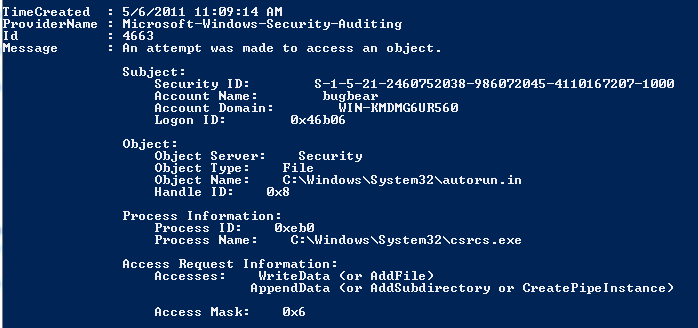
After playing with different variations of this query, I began to get creative during dynamic analysis of the Renocide worm and its effects on the System32 and HKLM registry keys. After enabling auditing on both objects, I came up with the following query to produce all changes made by the payload and malicious process. Note: the syntax when working with an externally saved evtx file.
<querylist>
<query id="0" path="file://C:\Worm.evtx">
<select path="file://C:\Worm.evtx">*[System[Provider[@Name='Microsoft-Windows-Security-Auditing'] and EventID=4663 and (Task = 12800 or Task = 12801)] and EventData[Data[@Name='ProcessName']='\Device\HarddiskVolume2\02MAY2011\scffog.exe' or Data='C:\Windows\System32\csrcs.exe']]</select>
</query>
</querylist>
This produced some interesting logs I used for further analysis.


If filtering multiple archived evtx files you can import the files into the mmc event viewer, create a view including them, and filter on that view. But dont expect to be able to work with a large amount of data. In fact, Microsoft will generate a warning if you attempt to import more than ten evtx files. Fortunately, there are faster and more flexible alternatives. Microsoft Log Parser will parse the binary (specify evt as the input type). Specifying a wild card in the filename will parse multiple files located in a specified folder and Log Parser also provides additional flexibility by allowing the use of statements such as "LIKE". The following are valid data fields that can be used when parsing evt/evtx binaries.


Note: If filtering by user you will need to use the SID and much of the event data, such as access masks, are combined as a string in the "Message" data field. The following is an example of a query that will pull events from multiple evtx binaries that contain the specified WriteData and Delete Access Mask values.

LogParser.exe -i:evt -o:csv "Select * from C:\Logs\*.evtx where EventID=4663 and (Message Like '%Access Mask: 0x6%' or Message Like '%Access Mask: 0x10000%')" > C:\Logs\Out.csv

Another alternative is Windows Powershell. The following is a similar example as the one given above (all WriteData and Delete Access Masks) using the Get_WinEvent and Where_Object Cmdlet'.

 get-winevent -path "C:\Logs\Comp1.evtx", "C:\Logs\Comp2.evtx" | where {$_.Id -eq "4663" -and $_.message -like "*0x10000*" -or $_.Id -eq 4663 -and $_.message -like "*0x6*"} > C:\Logs\Out.csv

 Using "| Format-List" provides a view of the data fields available for use with the "Where" statement.


While not ideal, the IT Practicioner or Incident Responder can certainly wrangle with evtx files without a SIEM or Log management system. The recent release of the Verizon DBIR report (2011) included a statement on page 60 that notes an interesting but not unexpected finding.

"...discovery through log analysis and review has dwindled down to 0%. So the good news is that things are only looking up from here..." - Verizon DBIR 2011

Happy Hunting!

Updated May 19, 2011

I intentionally did not provide any detail on enabling Object Access auditing in Windows since there is a fair amount of documentation available on that. In retrospect, however, I did want to mention a few things and share a few tips.

First, choose what Accesses you audit carefully. Accesses such as "List Folder/Read Data" are very noisy and will only increase the amount of logs you have to parse and may fill up the event log completely so it begins to overwrite itself (note: there are settings for the size of the log too).

Second consider what user or group you audit access for carefully. The "Users" group may be fine for auditing access to files stored on a file server but consider using the "Everyone" group if auditing changes made by malicious code. This group will include the System account.

Lastly, enabling auditing of changes to the system folders or registry may become resource intensive and non-manageable in a production environment. Use with caution. That said, I do believe it can be useful during analysis of malicious code. I would include a few more locations than just the System32 and HKLM however. The C:\Users, C:\ProgramData, and HKCU keys come to mind.

Friday, May 13, 2011

Renocide Worm: Hiding in Plain Sight

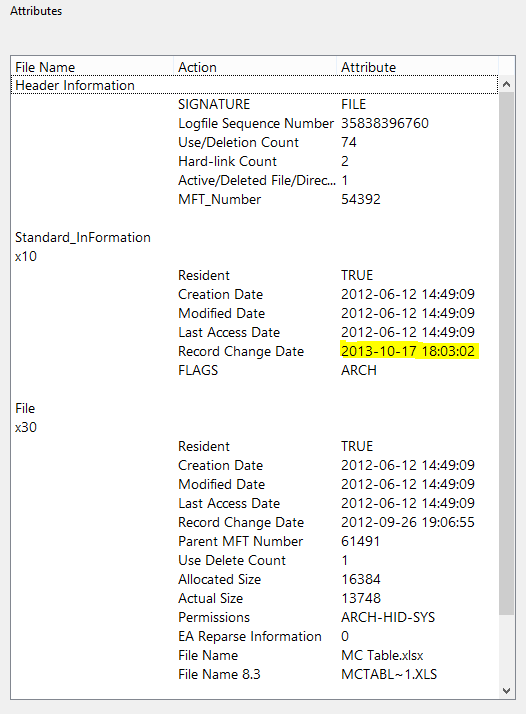
I recently came across a sample of Renocide which has been circulating for some time now. Microsoft recently published some of its infection numbers on the MSRT blog if you are interested. The malicious code takes advantage of the auto run settings in Windows and spreads via mapped drives and USB storage devices. Virus Total shows decent coverage by the AV industry. While not particularly unique, I did note something interesting when I parsed the NTFS $MFT table during analysis. The malicious code seems to manipulate NTFS $MFT Timestamps on several malicious files it creates in the %windir%\System32 folder. The following screen shot is the $MFT attributes for the process csrcs.exe which the payload creates.

csrcs.exe (MD5: 989460dc5f8ac5c886078f50720d71e8)

There a few things that struck me about the time manipulation. While it is not unusual to find the $SI born (creation) and modified attributes altered, I have never seen the $FN Born attribute changed. A closer look at the hex values of the $SI Born Attribute revealed something else.


The $SI Born time of "20e6 980c a303 ca01" converts more specifically to 2009-07-13 06:16:55.938000 . The usec value is not zero which is unusual. My first thought was that the date/time values were copied from another file but while the date mirrors other system files, the time correctly coincides with the time of infection. Things that make you go hmm.

Thursday, March 24, 2011

Pauldotcom Security Weekly: I am Talking about What?

On Thursday March 24, 2011 I will be presenting the tech segment on Episode 236 of PaulDotCom Security Weekly. The segment will cover the use of NTFS MFT timeline forensics in the static analysis of malware. This is a geekier version of my NAISG BOS presentation back in January and will cover some additional tools and technique's. The podcast begins around 8:00 PM and a live feed is available at http://www.pauldotcom.com/live. So if you are around, kick back with a beer, cigar, and listen live! I am looking forward to it.

Updated March 24, 2011 3:30 PM

As part of the tech segment this evening, Mark Mckinnon of RedWolf Computer Forensics has release the Windows beta of mft_parser which supports $MFT $SI and $FN bodyfile output from both the CLI and GUI. Big thanks to Mark from the Incident Response and Forensics community.

Friday, January 14, 2011

NAISG: Leveraging NTFS Master File Table Timeline Forensics in the Analysis of Malware

What is in your incident response kit?

Next week I am delivering a talk at the Boston Chapter of National Information Security Group (NAISG) on Thursday January 20, 2011. I will be speaking on the use of NTFS Master File Table Timeline Forensics in the Analysis of Malware. The meeting and talk is open to everyone and more information can be found here. If you are in the Boston area come down and check it out. NAISG will post the talk and slides at a later date and I will make sure I link back to it here.

Updated: February 1, 2011

NAISG has posted the video for my presentation here. The slide deck can be found on Slideshare here. I also wanted to say thank you to NAISG Boston chapter for having me. It was a blast!

Thursday, December 23, 2010

Not Just Another Analysis of Scareware

Introduction to our Sample

The initial infection came to my attention from an end user. He had reported all Google searches from his browser seemed to be forwarding to hxxp://findgala.com and he was getting warnings about malware on his computer. The system infected was a reasonably up to date Windows 7 notebook. The system was missing the latest patch for Adobe Flash (v 10.1.102.64). The user did not have administrator privileges, the windows firewall was enabled, Internet Explorer 8 with the default of medium/high security was set for the Internet Zone, and Symantec Endpoint 11.X was installed with up to date definition files. Note that Windows UAC was NOT enabled.

A quick assessment of the system determined it had been infected with some form of scareware. All existing desktop shortcuts had been removed and two shortcuts named "Computer" and "Internet Security Suite" remained. These pointed to "C:\ProgramData\891b6\ISe6d_2229.exe /z" and "C:\ProgramData\e6db66\ISe6d_2229.exe /hkd" respectively. The folder containing the executable was marked hidden and I noted the process was running via TACKIST /SVC. An icon running in the system tray when accessed presented the following screen.


Symantec Endpoint Protection seemed to be neutered by the infection as did several other Windows tools including Task Manager. Initial searching on the internet for the title of the malware only pulled links to legitimate Anti Malware products including CA, Zone Alarm, and Verizon's Internet Security Suite service.Virus Total returned the following analysis. Here is a summary of the file submitted:
File Name: ISe6d_2229.exe
File Type: Windows 32 bit Portable Executable
MD5: 699ebebcac9aaeff67bee94571e373a1
SHA1: ed763d1bc340db5b4848eeaa6491b7d58606ade2
File size: 3590656 bytes
First seen: 2010-11-14 01:20:29
Last seen: 2010-11-16 15:52:22
My general impression of the GUI was this was a well designed piece of code. I imaged the system with dd and instructed the desktop engineers to wipe the system and reset all the user passwords. This proved to be a mistake on my part as I did not verify my image before they wiped the system. Later I found myself unable to boot the raw image in VMware after converting it to a VMDK with Raw2VMDK (blue screen on loading the OS).

Static Analysis

I began with static analysis of the file system by mounting the image with FTK Imager Lite. I exported the Master File Table and parsed it with analyzeMFT . With the estimated time of infection obtained from the victim I was able to pinpoint the file's created and modified during the initial infection.


The initial few files listed in the MFT caught my attention first.
Record Type Parent  Filename
63861    Folder  602 e6db66
63915 File 2755 TASKKILL.EXE-8F5B2253.pf
63926 File 2755 SETUP_2229[1].EXE-11C68EE8.pf
63923 File 63861 ISe6d_2229.exe
The two prefetch files should give a hint of the name and location of the payload. I use Prefetch Parser to parse the C:\Windows\Prefetch folder to obtain some more details:
Record  File Times Run  UTC Time
SETUP_2229[1].EXE-11C68EE8.pf   SETUP_2229[1].EXE   1 Sat Nov 13 01:16:53 2010
TASKKILL.EXE-8F5B2253.pf TASKKILL.EXE  1 Sat Nov 13 01:16:53 2010
RUNDLL32.EXE-80EAA685.pf RUNDLL32.EXE 1 Sat Nov 13 01:17:16 2010
Further analysis of the .pf files gave me the location and names.
SETUP_2229[1].EXE-11C68EE8.pf     
\USERS\%USERNAME%\APPDATA\LOCAL\MICROSOFT\WINDOWS\TEMPORARY INTERNET FILES\CONTENT.IE5\G4KYBRHH\SETUP_2229[1].EXE

TASKKILL.EXE-8F5B2253.pf 
\USERS\%USERNAME%\APPDATA\LOCAL\MICROSOFT\WINDOWS\TEMPORARY INTERNET FILES\CONTENT.IE5\G4KYBRHH\ANPRICE=85[1].HTM

RUNDLL32.EXE-80EAA685.pf
\PROGRAMDATA\E6DB66\ISE6D_2229.EXE
It does appear the sample originated from the web. Unfortunately, I could not locate SETUP_2229[1].EXE or ANPRICE=85[1].HTM in the image. Most likely overwritten after several days of use post infection, I moved on the parsing the Internet browser history by using MiTeC Windows File Analyzer and began parsing the last few web sites and searches completed by the user. Unsuccessful in locating the source of the payload, I was not able to verify if it was delivered via a vulnerability or user interaction.

I moved on to use the MFT to locate all files associated with the infection and export the hashes. Here is a summary files found in the /[root]/ProgramData folder:
MD5 File
cd407baa9a55b9c303f0c184a68acc5c \E6DB66\6139ba67beb5a1febb1e8cfc73a42e9c.ocx
699ebebcac9aaeff67bee94571e373a1 \E6DB66\ISE6D_2229.EXE
2e317d604f25e03b8e8448c6884f64e3 \E6DB66\ISS.ico
3ee5ee57af2f62a47d2e93e9346b950f \E6DB66\mcp.ico
be44f801f25678e1ffdd12600f1c0bc7 \ISKPQQMS\ISXPLLS.cfg
The following summarizes files found in the /[root]/users/%username%/ folder:
MD5 File
2b7509a2221174a82f6a886bbdd2e115 \Desktop\Computer.lnk
fb16300f2f9799376807b13ad8314ca2 \Desktop\Internet Security Suite.lnk
fd00cfeecc333aedc56fd428f2b9b5ba \AppData\Roaming\Internet Security Suite\Instructions.ini
4635f17db7d2f51651bebe61ba2f4537 \AppData\Roaming\Microsoft\Windows\Recent\ANTIGEN.dll
6032703c3efc5f3d3f314a3d42e2a500 \AppData\Roaming\Microsoft\Windows\Recent\cb.exe
12ddf77984d6f2e81a41f164bea12a1c \AppData\Roaming\Microsoft\Windows\Recent\cid.sys
81c9ad6037c14537044b3e54d8b84c99 \AppData\Roaming\Microsoft\Windows\Recent\ddv.exe
f28c20c6df79e9fe68b88fb425d36d57 \AppData\Roaming\Microsoft\Windows\Recent\eb.sys
6274e77cd16d6dbec2bb3615ff043694 \AppData\Roaming\Microsoft\Windows\Recent\energy.drv
a3342f285bfb581f0a4e786cc90176d2 \AppData\Roaming\Microsoft\Windows\Recent\energy.sys
1ac2fb2dbd0023b54a8f083d9abbf6db \AppData\Roaming\Microsoft\Windows\Recent\exec.exe
2dc3df846ff537b6c3e6d74475a0d03d \AppData\Roaming\Microsoft\Windows\Recent\FW.drv
a32f789b1b6f281208fa1c8d54bf8cdc \AppData\Roaming\Microsoft\Windows\Recent\gid.dll
b48d1cc8765719a79a9352e2b8f891ef \AppData\Roaming\Microsoft\Windows\Recent\hymt.exe
532c6465f4dd9c7bce31b7a7986e3270 \AppData\Roaming\Microsoft\Windows\Recent\hymt.sys
f941f6eedf5b33a0b49b9787d5f0dfc2 \AppData\Roaming\Microsoft\Windows\Recent\kernel32.sys
2ff0c3a804b85d3e7e6487d9bece6416 \AppData\Roaming\Microsoft\Windows\Recent\PE.dll
454f06575c9214f7b9cb01c606fd72fe \AppData\Roaming\Microsoft\Windows\Recent\PE.sys
243b5a8a95bb4f8822790b8f0c81b82a \AppData\Roaming\Microsoft\Windows\Recent\ppal.exe
9d34330ec68d148cc5701d6cd279c84c \AppData\Roaming\Microsoft\Windows\Recent\SICKBOY.drv
493fc17532f9b6ac330dbdb3a01a5361 \AppData\Roaming\Microsoft\Windows\Recent\sld.drv
d0d210a62cb66ff452e9a5cfc8e8f354 \AppData\Roaming\Microsoft\Windows\Recent\SM.sys
a2ca707ee60338ac5ec964f7685752ba \AppData\Roaming\Microsoft\Windows\Recent\std.dll
a1e25ab2f19565f707d85e471f41e08f \AppData\Roaming\Microsoft\Windows\Recent\snl2w.dll
I also noted that the hosts file had been modified at the time of infection. The following is a sample of entries that had been added (note: additional countries root domain entries for the top search engines were also added but are not included in this analysis for simplicity's sake):
74.125.45.100 4-open-davinci.com
74.125.45.100 securitysoftwarepayments.com
74.125.45.100 privatesecuredpayments.com
74.125.45.100 secure.privatesecuredpayments.com
74.125.45.100 getantivirusplusnow.com
74.125.45.100 secure-plus-payments.com
74.125.45.100 www.getantivirusplusnow.com
74.125.45.100 www.secure-plus-payments.com
74.125.45.100 www.getavplusnow.com
74.125.45.100 safebrowsing-cache.google.com
74.125.45.100 urs.microsoft.com
74.125.45.100 www.securesoftwarebill.com
74.125.45.100 secure.paysecuresystem.com
74.125.45.100 paysoftbillsolution.com
74.125.45.100 protected.maxisoftwaremart.com
69.72.252.252 www.google.com
69.72.252.252 google.com
69.72.252.252 www.google.no
69.72.252.252 www.google-analytics.com
69.72.252.252 www.bing.com
69.72.252.252 search.yahoo.com
69.72.252.252 www.youtube.com
Using bintext to pull the strings from ISe6d_2229.exe provided a few interesting things of note. Specifically a company and product name of "limnol" and file and product version of "1.1.0.1010". Searches for this reference with some added keywords found some additional submissions to virus total but nothing that was not already known from my earlier submission.

There were also strings associated with a Microsoft Windows manifest file. Such a file can be embedded in software by the developer to instruct Windows Vista and Windows 7 on what Privileges the software needs to run as. The default setting of "run as the user" was obtained from the strings:
<security>
<requestedprivileges>
<requestedexecutionlevel level="asInvoker" uiaccess="false"></requestedexecutionlevel>
</requestedprivileges>
</security>
I continued the analysis by taking a look at the Windows registry. This was done by exporting the HKCU and HKCM hives from the raw image and using both RegRipper and MiTeC Windows Registry Recovery to analyze the entries. The HKCU Run key contained an entry to autostart the executable on startup.
[HKEY_CURRENT_USER\Software\Microsoft\Windows\CurrentVersion\Run]
"Internet Security Suite"="\"C:\\ProgramData\\e6db66\\ISe6d_2229.exe\" /s /d"
In addition, I was able to verify that the registry contained an entry for findgala.com under:
[HKEY_CURRENT_USER\Software\Microsoft\Internet Explorer\SearchScopes]
"URL"="http://findgala.com/?&uid=2229&q={searchTerms}"
The [HKEY_CURRENT_USER\Software\Internet Security Suite] key contained several subkeys within it. The entries here seemed to be similar to the contents of the Instructions.ini file found earlier in the appdata folder of the user profile. This file resided in a hidden folder with the same name as the registry key. I have listed one entry as an example here.
[HKEY_CURRENT_USER\Software\Internet Security Suite\23071C180E1E]
"3016131C2F0B18311F0CF4D5EBEEE1"="4746574B4E544E4D4F4FA0B0B8B2B5BFB7BEA8D9C7"
"23071C180E1E31180D0CE1E6E7"=""
"2205012C0A1F2814131A"="4746574B4E544E4D4F4FA0B0B8B3BDBFB2B7A8D9C7"
"3A160B0D2E090534100CF4F3F7E0F0ECE9E9"="4746574B4E544E4D4F4FA0B0B8B2B5BFB7BEA8D9C7"
"3A160B0D3C1E19192E3BCD"="4746574B4E544E4D4F4FA0B0B8B3BDBFB2B7A8D9C7"
"3A160B0D2F0B181C0A1A"="4746574B4E544E4D4F4FA0B0B8B3BDBFB2B7A8D9C7"
"3A160B0D34140E101F13D5F1E6E2F0E0"="4746574B4E544E4D4F4FA0B0B8B2B5BFB7BEA8D9C7"
"3E22081D1B0F19"="46"
"24181415181A1F16"=""
"2205012C0A1F1D091B2DF5EFC1ECF1EBF2"="46"
"3E1E1C1D1F15290D1A1EF4E4C1ECF1EBF2"="46"
"3B1E0A0B15093F120B11F4"="46"
"3218151813154C"=""
"23071C180E1E"="46"
Lastly, the [HKEY_LOCAL_MACHINE\SOFTWARE\Microsoft\Windows NT\CurrentVersion\Image File Execution Options\] key had several entries for what appeared to be legitimate software, tools, and other forms of malware. Entries included; taskmgr.exe, rtvscan.exe (Symantec Endpoint Protection), and dozens of other programs. All legitimate and illegitimate software was being blocked via an entry for debugger with a value of "svchost.exe".

Dynamic Analysis

I began dynamic analysis by first attempting to infect a virtualized Windows 7 system in my lab (Note: all initial attempts were with administrator privileges with UAC disabled). Running the executable seemed to generate a runtime error, so I attempted to run it from the command prompt with the /hkd switch found in the desktop shortcut during static analysis. Process Monitor was used in an attempt to capture all file, registry, and network connection changes during infection. The following error was displayed;


Thinking it picked up on Process Monitor, I tried again but without procmon.exe but I was presented with the same error. It seemed that this sample was VM aware. Again I attempted to infect a clean install of Windows 7 on physical hardware with procmon.exe and again, I was met with failure. I turned to utilizing CaptureBat to monitor file and registry changes during install. Infection proceeded but I noted my sample used for analysis had been removed. On further inspection, it appeared that a .bat file was the culprit. The contents of the file were as follows;
MD5                                                        FileName
329e8a313f20cd8b4ebf67642331c007    \Users\bugbear\AppData\Local\Temp\del.bat

:Repeat
del "C:\Users\bugbear\Desktop\e6db66\ISE6D_~1.EXE"
if exist "C:\Users\bugbear\Desktop\e6db66\ISE6D_~1.EXE" goto Repeat
del "C:\Users\bugbear\AppData\Local\Temp\del.bat"
I also noted the name of the files and folders associated with the malware seem to vary on each infection. Verification of hashes proved that it was indeed the same malicious program however. File and registry monitoring verified the findings from the static analysis and I noted some additional changes as well. It appeared the rogue software attempts to disable UAC by editing the following registry keys;
registry: SetValueKey C:\Users\bugbear\Desktop\e6db66\ISe6d_2229.exe -> HKLM\SOFTWARE\Microsoft\Windows\CurrentVersion\Policies\System\ConsentPromptBehaviorAdmin
registry: SetValueKey C:\Users\bugbear\Desktop\e6db66\ISe6d_2229.exe -> HKLM\SOFTWARE\Microsoft\Windows\CurrentVersion\Policies\System\ConsentPromptBehaviorUser
registry: SetValueKey C:\Users\bugbear\Desktop\e6db66\ISe6d_2229.exe -> HKLM\SOFTWARE\Microsoft\Windows\CurrentVersion\Policies\System\EnableLUA
Additional registry entries in HKEY_Current_User were also modified. Including the Internet Explorer proxy and wpad settings under [HKCU\Software\Microsoft\Windows\CurrentVersion\Internet Settings]. Additionally, rather than modify the host file directly, the executable seemed to create a temporary host file, remove the old one, and replace it with this new version.
file: Write C:\Users\bugbear\Desktop\e6db66\ISe6d_2229.exe -> C:\Windows\System32\drivers\etc\host_new
file: Delete C:\Users\bugbear\Desktop\e6db66\ISe6d_2229.exe -> C:\Windows\System32\drivers\etc\hosts
file: Write C:\Users\bugbear\Desktop\e6db66\ISe6d_2229.exe -> C:\Windows\System32\drivers\etc\hosts
file: Delete C:\Users\bugbear\Desktop\e6db66\ISe6d_2229.exe -> C:\Windows\System32\drivers\etc\host_new
Typical "features" associated with scareware seemed to be included with this sample. The rogue software begins a "scan" of the infected system immediately upon execution. Scan results display "infected" files located in [root]\Users\%username%\AppData\Roaming\Microsoft\Windows\Recent\ folder identified during static analysis.


Please note, no attempt was made to identify these files as legitimate malware by myself, although that may be an interesting exercise for another time. Not unlike an episode of the Soprano's, the victim is intimidated into buying protection and is offered several opportunities to buy a subscription. Multiple subscription options are available.


At one point my lab system spewed a blood curdling scream from its speakers before displaying yet another option to "protect" oneself (a little over the top if you ask me). My favorite feature goes to Chat Support however.

I do not think Jane appreciated my bluntness. Network connections for both the subscription service and chat support sessions were collected with the following script which leverages the netstat command.
 for /L %1 in (0,0,0) do netstat -anob>>C:\netstat.txt
Both IP addresses associated with the subscription service and chat support sessions were registered to hosting providers here in the US. The strangest behavior observed however, was captured with Process Explorer and Wireshark post infection. Multiple instances of ping.exe running under cmd.exe were noted. Upon examination of the packet capture, it appeared the processes were spewing ICMP and SYN packets to two IP Addresses registered to .RU domains.


Soon after this behavor was noted. The executable associated with the infection was mysteriously removed from the system. Attempts to duplicate this behavior later failed.

Further analysis of the infection and sample was done without administrator rights and with UAC disabled. No edit of the hosts file or registry keys in HKLM were noted, however. The malware still setup shop within the ProgramData and User Profile locations noted with the earlier analysis but the fact the user with the original infection had no administrator rights and the host file and HKLM keys were modified remains a bit of a mystery. One might speculate, the original payload might behave differently.

Further Google searching utilizing these findings led me to Microsoft's Malware Protecton Center write-up on Rogue:Win32/FakeVimes. Although Virus Total had not indicated such, it would seem our sample has had many aliases and upgrades.

Lessons Learned 

All in all I learned a lot and had fun analyzing the sample (it beats watching sitcoms). Few things I noted for future analysis attempts.
  • Always verify your images and keep the original copy if possible (aka don't be a dumbass Tim)
  • Static file forensics techniques can be very useful during malware analysis
  • Have multiple tools that can perform similar tasks is sometimes needed
  • Fear is a powerful marketing angle and the bad guys are getting better at it

Feel free to ping me if you would like a copy of the sample. I would be more than happy to trade notes with others.

Update: Questions Unanswered

Updated on December 30, 2010.

Curt Wilson was kind enough to comment on my analysis earlier this week. He brought up an interesting tidbit that I had missed. The title of error message displayed when attempting to perform dynamic analysis in a virtualized environment references Themida, a known packer used in malware. The following screen shot obtained from Google images is telling:


According to the results of my initial Google searches, Themida has been around for some time. There are some scripts available for OllyDbg to unpack executables using this tech so I hope to continue down the rabbit hole.

Moreover, I think the files placed in the recent folder of the user profile is worth a quick look, as is the payloads of packet captures. Looks like I have some interesting commutes ahead of me on the train. Until Part II of the analysis, Happy Hunting!